
Simple History 5.25.0 makes your activity log database smaller and your searches faster.
Even on a typical site, activity logs can quietly accumulate more data than you need — especially around things like repeated login attempts (often due to brute force attempts) or detailed post diffs for large posts. Database size is one of the most common things people ask about, and rightfully so — so with this release, Simple History gets a bit smarter about what it stores and for how long.
Three things that keep the log manageable
These all work out of the box — no settings to change.
Failed login rate limiting
If a brute force attack hammers your login page with thousands of login attempts, Simple History now caps the logging of those at 100. So after 100 consecutive failed attempts it stops recording until a successful login or another event (like a post edit or plugin update) clears the counter. On some sites, this alone was responsible for millions of unnecessary database rows.
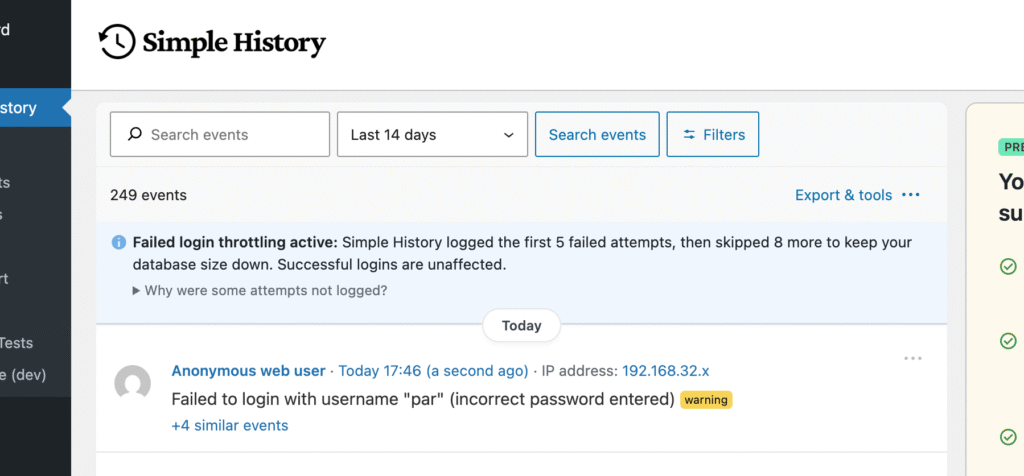
When throttling is active you will see get a small message at the top of the log, so you know what’s going on.
Compact diff storage
When a post is edited, Simple History used to store the full old content and full new content, and use this information to create a visual diff (list of changes) when the log was viewed.
This worked fine, but on sites with large posts this meant that the full post content was stored two times for each post edit, resulting in sometimes quite large contexts.
We have now changed this behaviour to be smarter: it can now use a compact diff format that only stores the differences between the new and old post. This compact format is up to 99% smaller for typical edits. If you change a typo in a 5,000-word post, the stored data drops from roughly 50 KB to under 1 KB — that one small change, not two copies of the entire post.
The diffs are created using the library php-diff by @jfcherng.
Smarter default retention
New installs now start with 30-day retention for a smaller database out of the box. Existing installs stay at 60 days unchanged. If you want longer retention or full control over how long history is kept, that’s what Simple History Premium is for.
Faster & more accurate search
Search has gotten a significant overhaul. Queries now skip occasion grouping entirely and only scan the metadata fields that each logger actually uses, instead of searching through everything. The result: faster queries and more relevant matches.
If you need to search across all metadata (IP addresses, emails, raw field data), there’s a new dedicated “Event metadata” field in the advanced filters for that.
Press / to search
A personal favorite (since I am a keyboard/shortcut fanatic!): now you can press / anywhere on the log page to focus the search input field.
Minor UI improvements
Some smaller fixes that we hope you will notice:
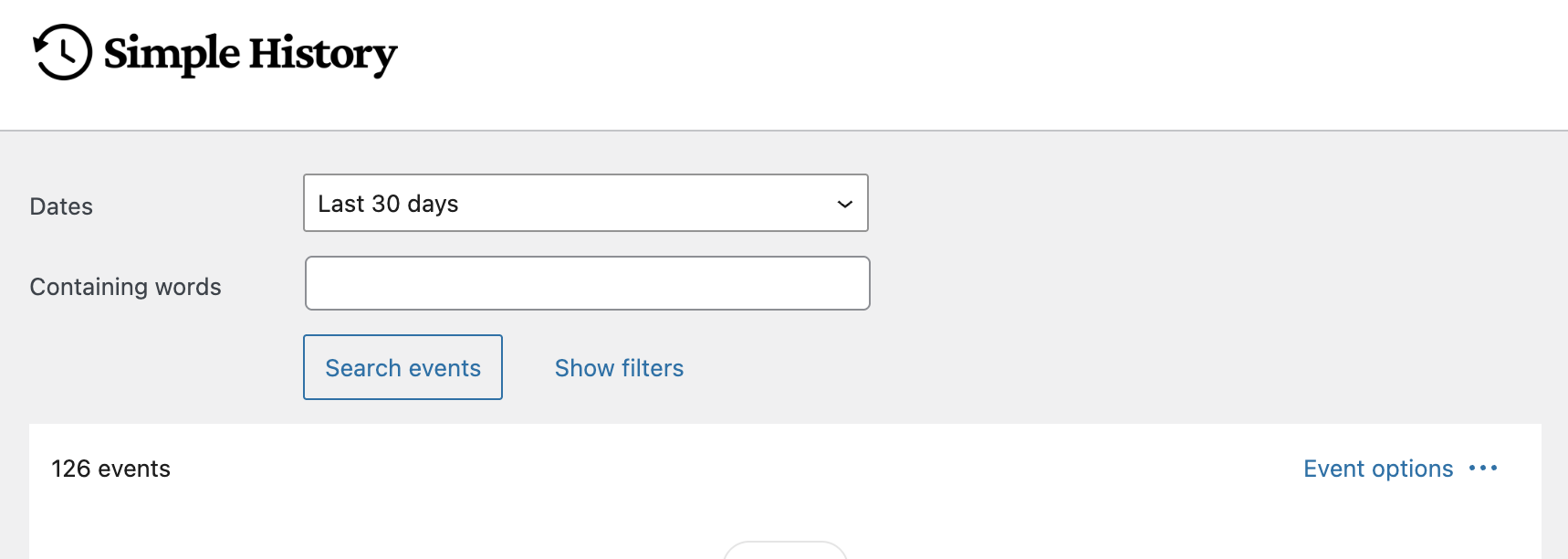
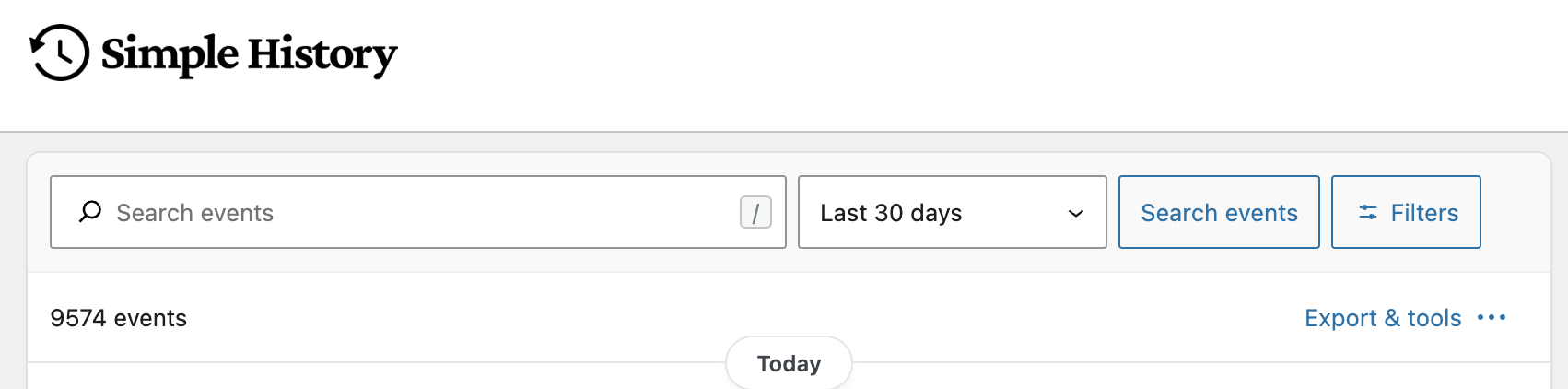
The biggest visual change: search and filters now live on a single compact row.
Before:
After:
Other UI improvements:
- Hover quick actions — Event rows now reveal a quick action button when you hover over them, giving faster access to event details.
- History Insights sidebar — Today’s data point is highlighted with a visible dot, the end date shows “(today)” for clarity. Also the y-axis is a bit cleaner.
Get the update
Simple History 5.25.0 is available now. Update from your WordPress dashboard or download it from WordPress.org.
If you’re managing sites with large activity logs or lots of post edits, the compact diff storage alone should make a noticeable difference in database size over time.
Found a bug or have feedback? Let us know on the support forum.
Full changelog
Added
- Failed login rate limiting is now active for all users, capping logging at 100 consecutive failed attempts to prevent database bloat from brute force attacks.
- Compact diff storage for post content changes is now active for all users, storing only a compact diff instead of full old+new content (up to 99% smaller for typical edits) with automatic fallback when the diff would be larger.
- Search is now faster and more accurate for all users: queries skip occasion grouping for speed and only search relevant context keys from registered loggers instead of scanning all metadata.
- Hover-reveal quick action button on event rows for faster access to event details.
- List of current experimental features shown near the enable toggle in settings.
- “/” keyboard shortcut to focus the search input, with a visual hint badge. Pressing Escape returns focus to the previously focused element.
- Settings and Premium/Get Premium buttons in the top-right header, replacing the Add-ons link.
- Email Reports settings moved to their own sub-tab under Settings for better discoverability.
- Feature discovery bar in the page header showing active features and settings status with dot indicators (experimental).
- New installs default to 30-day retention (existing installs keep 60 days).
Changed
- Search and filters redesigned into a single compact row with search input, date selector, and action buttons — replacing the previous multi-line layout.
- Expanded filters panel now stacks labels above inputs on smaller screens for better usability.
- History Insights sidebar: today’s data point is now highlighted with a visible dot and the end date shows “(today)” for clarity.
- History Insights sidebar: reduced y-axis clutter on the activity chart for a cleaner look.
- History Insights sidebar: database stats section is now visually separated as footer content with cache freshness info moved into the tooltip.
Fixed
- Dashboard widget corners not matching the new rounded style in WordPress 7.0.
- PHP notice on the widget editor screen (widgets.php) caused by the command palette script loading wp-editor on non-post-editor screens.
- Occasion counts in the RSS feed were always zero and never rendered.
- Inverted condition in the GitHub plugin info handler that caused it to always fail.
- “No matching events” empty state text and icon too light to meet WCAG AA contrast requirements.
- Deprecation notice when using Yoast Duplicate Post 4.6, which replaced the dp_duplicate_post and dp_duplicate_page hooks with duplicate_post_after_duplicated.
Security
- Nonce verification added to the GitHub plugin info AJAX handler to prevent CSRF.