
Did you know that according to the WordPress.org plugin guidelines, a plugin is not allowed to track a user without their consent. That’s a good rule that sometimes plugin authors break. Sometimes by accident, sometimes deliberately.
So you can understand that this debug message in Simple History with the Debug & Monitor add-on installed caught our attention.
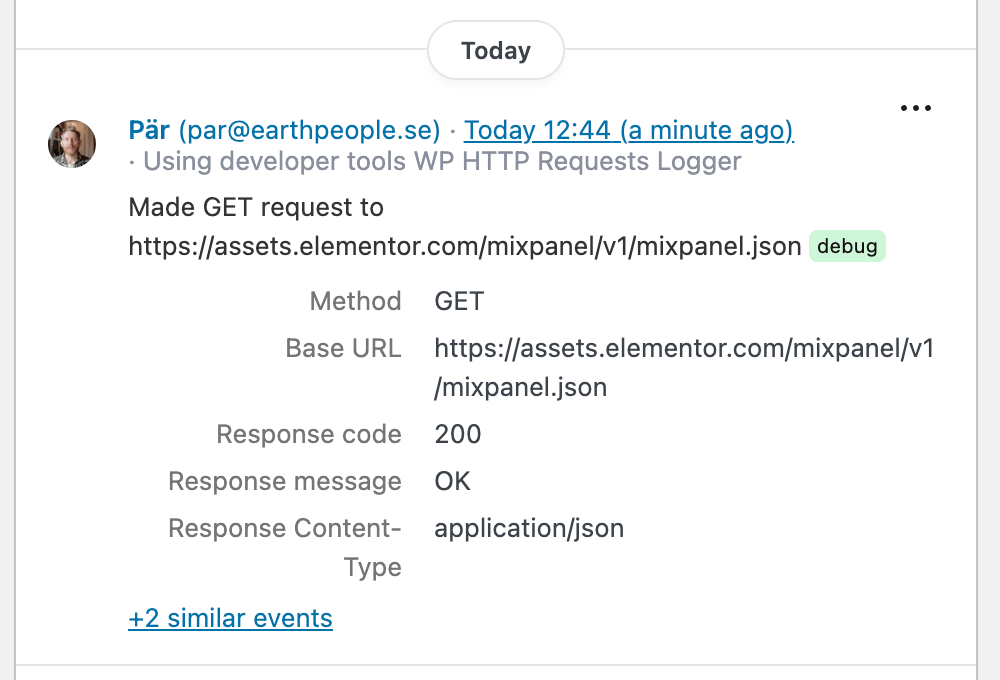
What? An outgoing GET request? But how?
Now, normally, if a plugin does “call home” to gather statistics or similar there is no way for a WordPress admin user to know this. No outgoing requests are shown or logged.
To know that a request was made you need to hook into the http_api_debug action and log the response somewhere. And this is exactly how the Debug & Monitor add-on for Simple History logs outgoing requests. Thanks to the nice interface of Simple History you can easily see when a request is done and where it came from and to where it’s requested.
Now the request in the screenshot above goes to elementor.com, so we do really suspect that the request is coming from Elementor. But to make sure we use Detective Mode to add more details to the event context. After another outgoing request is done we can clearly see that it was the plugin Elementor that made this request.

So now we know where the request came from. And a quick web search found some existing support issues regarding this:
- Usage tracking even when Data Sharing is off
- mixpanel.json: Usage tracking even when Data Sharing is off
And even a fix from Elementor themselves, confirming that they did the request: Fix: User settings not applied correctly (#34065).

So in this case maybe it was not some sneaky analytics being sent. It was a bug.
Btw, Simple History does follow that rule – we don’t even offer the option to opt-in for usage analytics.