
A week ago, on a local test website on mine, WooCommerce suddenly got updated. Now this was a bit strange since I do not have auto-update enabled for WooCommerce and I did not perform an update.
This is how it looked in the Simple History log. Just like a regular plugin update.

I had not updated the plugin. Auto-updates was not enabled for the plugin. But an update did happen.
So how and why did the plugin get updated?
I had an idea and started researching this idea and it turned out to be true: The plugin had a security issue and was forced update by wordpress.org.
Forced update research steps and result
Let’s start research project: How does WordPress know that a plugin should be forced update?
I have some knowledge of how the WordPress plugin update process works, so I started digging through the WordPress source code and the WordPress.org Update API to understand how these forced auto updates work.
To forcibly auto update a plugin feels like a pretty big thing, so you would come to think that this would be very good documented somewhere. Strangely enough I have only managed to find a few pages that mention this forced auto update thingie. There’s very little official documentation, but I found a few sources that mention the autoupdate field. The most comprehensive post I’ve found is “Automatic Updates in WordPress” by Brandon Kraft.
In this article he mentions the autoupdate field. I had a vague idea that a field like that existed, but I had never managed to see the actual API response for a plugin that was set to forced update. (I did a lot of testing some years back, but perhaps I sent the wrong curl commands or the plugins I tested with had they forced auto update window closed – if there now even is such a thing!) So before this research I just never found that autoupdate field before and was never able to trigger a forced update of a plugin.
But thanks to being quick with the research as soon at WooCommerce updated to 10.4.3 I was finally able to catch a result with the autoupdate field!
An interested note: WooCommerce 10.4.3 was released on December 22, 2025 but my update happened first on Januari 13, 2026. That makes me think that they enabled forced auto updates first after a while.
The Hidden autoupdate Flag
When WordPress checks for plugin updates, it queries the WordPress.org API. The response includes the usual information: new version number, download URL, compatibility data.
But there’s also an autoupdate field that most people never see or know about:
stdClass Object (
    [slug] => woocommerce
    [new_version] => 10.4.3
    [autoupdate] => 1
    [upgrade_notice] => Version 10.4.3 contains security fixes...
)Code language: PHP (php)
When autoupdate is set to 1, WordPress will install this update regardless of your auto-update settings. The WordPress.org security team sets this flag manually when they need to patch a critical vulnerability across all affected sites.
I think this has been available since WordPress 5.5 (2020), but it’s rarely used. It’s the nuclear option—reserved for situations where leaving sites unpatched poses a significant security risk.
How WordPress Decides What to Update
Here’s the actual logic WordPress uses, simplified from class-wp-automatic-updater.php:
// First: Is this a forced security update from WordPress.org?
$update = ! empty( $item->autoupdate );

// Second: Did the user enable auto-updates for this plugin?
if ( ! $update ) {
    $auto_updates = get_site_option( 'auto_update_plugins', array() );
    $update = in_array( $plugin_file, $auto_updates, true );
}

// Third: Apply filters (developers can override)
$update = apply_filters( 'auto_update_plugin', $update, $item );Code language: PHP (php)
The security team’s autoupdate flag takes priority over everything else. Your per-plugin auto-update toggle? Ignored. The only way to prevent it is with a code filter.
Simple History now displays forced auto updates
So after all this research, this is how Simple History from the next version will display that a plugin was forced updated. A clear text message that syas the the plugin was a security auto update.
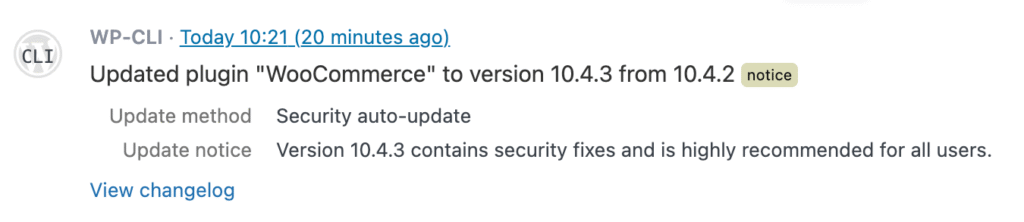
This message can be very useful and helpful since forced automatic updates confuse users. I have seen many posts at the WordPress.org forum where users are confused and frustrated due to forced automatic updates.
What Simple History Now Tracks
Simple History distinguishes between three types of plugin updates:
Security auto-update: WordPress.org forced this update. You didn’t enable auto-updates, but the security team decided the patch was critical enough to push anyway.
Auto-update: You enabled auto-updates for this plugin, and it updated as expected.
Manual: You clicked the “Update” button yourself.
When a forced security update occurs, Simple History:
- Logs it at the
noticelevel (higher than the usualinfolevel for updates) - Shows “Update method: Security auto-update” in the event details
- Displays the upgrade notice from WordPress.org explaining why the update was important
Here’s what it looks like in practice:
The Technical Details
If you’re curious how we detect forced updates, here’s the approach:
- When a plugin update completes, we check the
update_pluginstransient for theautoupdateflag - We also check the
auto_update_pluginsoption to see if the user enabled auto-updates - If the API flagged it for forced update and the user didn’t enable auto-updates → it’s a security auto-update
$update_plugins = get_site_transient( 'update_plugins' );
$auto_updates = get_site_option( 'auto_update_plugins', array() );

$api_forced = ! empty( $update_plugins->response[ $plugin ]->autoupdate );
$user_enabled = in_array( $plugin, $auto_updates, true );

if ( $api_forced && ! $user_enabled ) {
    // This is a forced security update
}Code language: PHP (php)
We’ve documented a real API response with the autoupdate flag in this GitHub Gist if you want to see what it looks like.
Why This Matters
For site owners, knowing why a plugin updated answers the question: “Did I do this, or did something else?”
For agencies managing client sites, it helps explain unexpected changes. “Your WooCommerce updated overnight” sounds concerning. “WordPress.org pushed a security patch to all sites” is reassuring.
For compliance purposes, you now have an audit trail distinguishing between intentional changes and automatic security responses.
Try It Out
This feature is available in Simple History 5.23 and later. The next time a security update gets pushed to one of your plugins, you’ll see exactly what happened and why.
Have questions about plugin updates or activity logging? Let us know!
Want to see this on your own site? Simple History is free on WordPress.org. It logs every plugin update and tells you if WordPress forced it, along with post edits, logins and settings changes.