
Simple History 5.26.0 makes event log actions more discoverable and introduces event reactions as an experimental feature.
Actions are now inline buttons
Export and Create Log Entry used to live behind a dropdown menu in the control bar. In 5.26.0 they’re inline buttons instead — one click away and clearly visible.
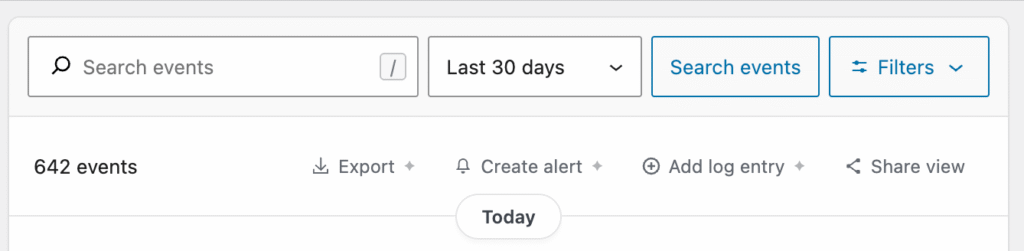
This is good news if you’ve ever forgotten where to click to export your log. Or if you did not even know that the option existed!
The control bar also has two new buttons:
- Create alert that takes the current filters and creates an alert from them
- Share view that copies the current URL with all enabled filters so you can share it in for example Slack or in an email.
Event reactions (experimental)
You can now react to log events with a thumbs up emoji. A Slack-style emoji picker lives in the event actions bar, and reaction counts are visible on the event row. This is useful for teams who want to acknowledge events. Like a “yep, I saw this”.
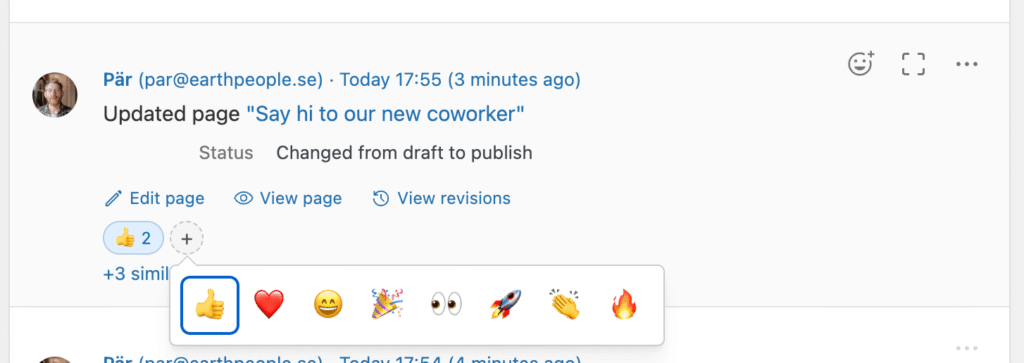
Reactions are experimental — enable them from Settings → Experimental features. Simple History Premium users get the full emoji set (❤️, 😄, 🎉, 👀, 🚀, 👏, 🔥) in addition to thumbs up.
Get the update
Simple History 5.26.0 is available now. Update from your WordPress dashboard or download it from WordPress.org.
Full changelog
Added
- Media, Comments, and Themes sections to the weekly email summary report. Comments section only appears when comments are enabled on the site.
- Event reactions — react to log events with a thumbs up emoji, with a Slack-style emoji picker in the actions bar (experimental).
--fieldssupport forwp simple-history listWP-CLI command, including areactionsfield showing reaction counts.
Changed
- Control bar actions are now inline buttons instead of a dropdown menu, making Export, Create Alert, Create Log Entry, and Share View more visible and accessible.
- Expanded filters panel: reordered filters with Users first, moved “Hide my own events” into the Users row, replaced initiators help link with an icon, and trimmed helper text for a cleaner layout.
Fixed
- Memory exhaustion when exporting large event logs by reducing batch size and eliminating redundant database queries.
- Layout shift in control bar action buttons while search options are loading.
- Oversized file type icon for non-image attachments (e.g. DOCX, PDF) in the event log.