
You can now filter the log by user role, for example to see only what administrators and editors did.
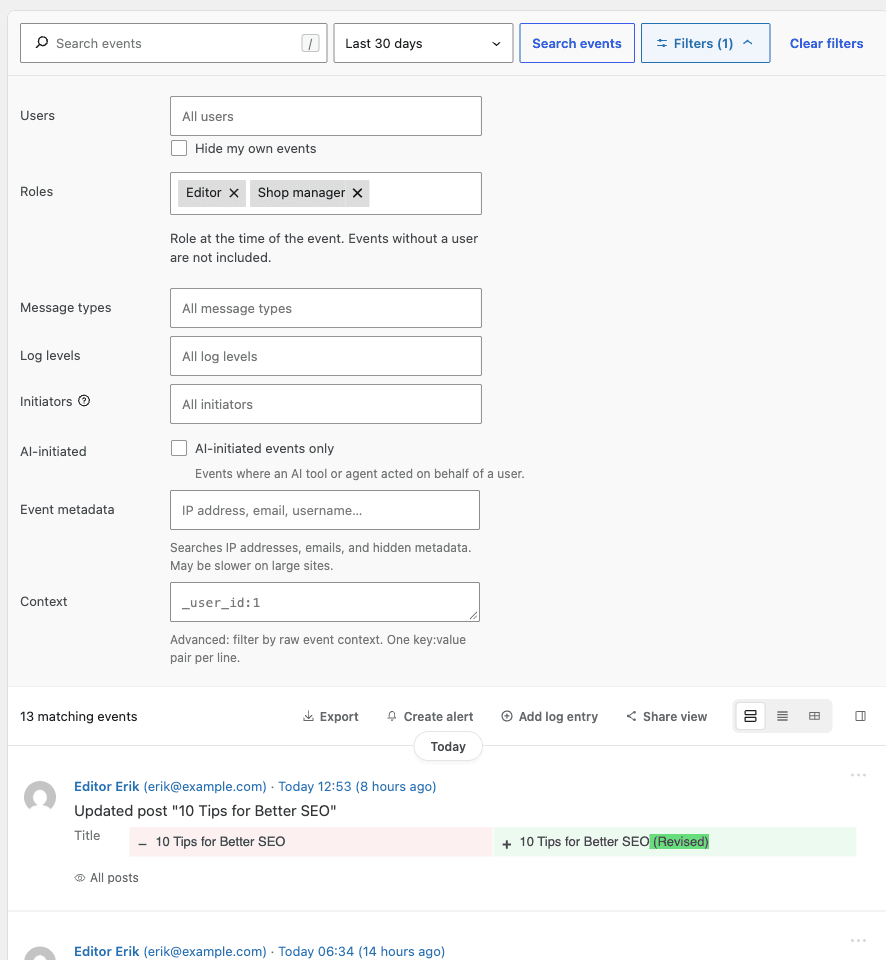
Filter the log by role
Open Filters and pick one or more roles under Roles. The log then shows only what users with those roles did. It uses the role the user had when the event happened, so changing someone’s role later doesn’t move their old events. A user with more than one role, like a shop manager who is also a forum moderator, shows up under each of them.
Logins, logouts and password resets store the role from 5.37.0 on, so older events of those kinds won’t show up when you filter by role.
Developers can use the same filter in the REST API, Log_Query and WP-CLI: wp simple-history list --user_role=editor,author.
Black Week: until December 1, Premium is 30% off your first year with code BLACKWEEK26.
Update from Dashboard → Updates, or download it from WordPress.org. If something looks off, let me know.
Full changelog
Added
- Role filter for the event log. It uses the role the user had when the event happened.
- For developers:
user_rolesandexclude_user_rolesin the REST API,Log_Queryand WP-CLI. Extra roles are stored as_user_role_2,_user_role_3and so on.
Fixed
- Login, logout, password reset and User Switching events didn’t store the user’s role.