
When an AI tool touches your WordPress site — Claude Code, ChatGPT, Cursor, an MCP client, the WordPress Abilities API — Simple History notes it on the event row. A small sparkle icon and the agent’s name show up next to the user who initiated the action.
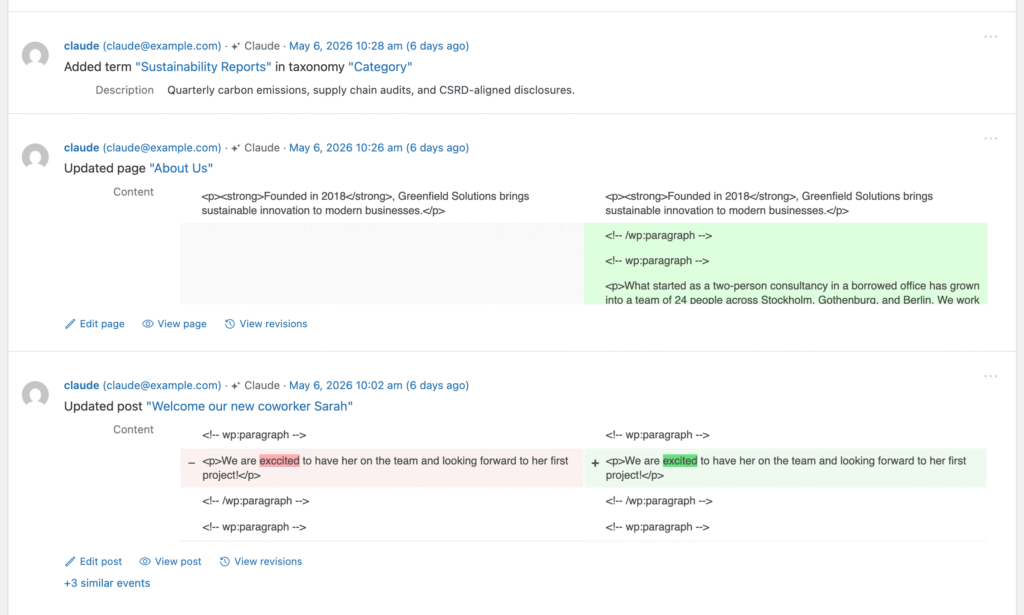
Available from Simple History 5.27.0.
The signed-in user is still the real user
AI attribution is additional audit context, not a replacement for the user. If you log in to your site and ask Claude Code to update a plugin, Simple History still records you as the user who made that change — because you are. The AI label sits alongside your name to show how the action was performed.
AI tools act on behalf of a real, authenticated WordPress user. Simple History just notes when one of those tools appears to be involved.
Why this exists
More and more WordPress work happens through AI assistants — they install plugins, edit content, run WP-CLI commands, hit REST API endpoints. From the database’s point of view, all of that looks like ordinary user activity. AI agent detection answers a simple question at a glance: did a human click this, or did a tool do it for them? Useful for audit, useful for the “did an AI workflow touch the site that night?” check that would otherwise mean digging through server logs.
How detection works
Detection is heuristic. There is no single perfect signal — AI tools identify themselves in different ways, and request headers can be spoofed. Instead of relying on any one thing, Simple History looks at six independent signals and picks the strongest match it can find.
- WordPress Abilities API. Events triggered through this official WordPress API — which is specifically designed for AI integrations — are tagged automatically. This is the most reliable signal because the API itself tells us an AI is involved.
- Signature-Agent header. A cryptographically signed request header that a verified AI agent can attach to its requests. When present and valid, this is a high-confidence signal.
- MCP client request header. A dedicated header used by AI coding tools that speak the Model Context Protocol (MCP) — for example, when an editor like Cursor or Claude Code talks to your site through an MCP bridge.
- User-agent string. The name the AI tool reports in its HTTP request — Claude Code, ChatGPT, Cursor, and several others have recognizable user-agents. This is convenient but easily faked, so it’s treated as a softer signal.
- WP-CLI environment marker. When AI tools run WP-CLI commands, they often set an environment variable that identifies them. Simple History picks this up for command-line activity.
- Other request signals. A catch-all for hints that don’t fit the patterns above — keeps detection working as new tools appear.
I’m deliberately not publishing the exact regex patterns or header values — that’d just hand evaders a checklist. The specifics live in the plugin source on GitHub if you want the full picture.
Privacy
All detection happens locally on your WordPress site. Nothing about the request, the user, or the agent is sent anywhere — not to Simple History, not to any third party. The detection result is stored alongside the event in your own database, just like every other piece of context Simple History records.
Filtering the log for AI activity
Version 5.27.0 adds a new filter that lets you show only events triggered by AI agents. You’ll find it in the regular filter controls above the event log. Combine it with the date range or user filters to answer questions like “what did AI tools do on the site last week?”
WP-CLI
If you prefer the command line, the WP-CLI simple-history list command now supports an ai_agent column:
wp simple-history list --fields=date,user,message,ai_agentCode language: PHP (php)That column will be empty for ordinary human-initiated events and populated with the agent name when one was detected — handy for scripting, exports, and quick spot checks.
A note on accuracy
Because some of the signals can be spoofed, treat the AI label as informational rather than authoritative. A missing label doesn’t prove no AI was involved, and a present label doesn’t prove anything malicious — most AI activity on a WordPress site is just an admin getting work done faster. The real audit trail is still the user and the change itself, exactly as Simple History has always recorded them.
If you spot an AI tool that Simple History doesn’t recognize yet, or have ideas for improving detection, please open an issue on GitHub — I read every one.