
Two features that have been sitting behind the experimental flag are now on for everyone: reactions, and a header status bar that tells you what your log settings actually are. Simple History also started logging changes to its own settings — which, yes, it probably should have been doing all along. Plus a round of security hardening and a long list of fixes.
Reactions are on by default now 👍
Reactions have been available behind the experimental features setting for a while. They’re on by default now.
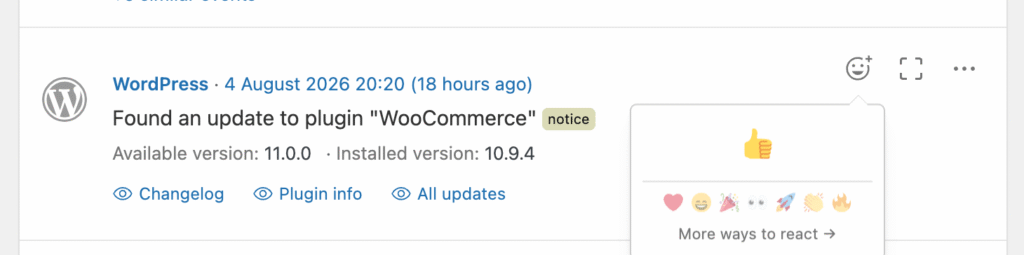
Hover over any event and a small thumbs-up appears. It sounds trivial until you’re working on a site with someone else: you can mark that you’ve looked at an event, or point a colleague at one, without leaving a note somewhere else or sending a message about it.
Because the button only shows on hover, it stays out of the way on single-user sites. (And if you’d rather not have it at all, turn it off in Settings → Simple History → General.)
Reactions are everywhere now — Slack, Bluesky, even Gmail. Your audit log may as well join in.
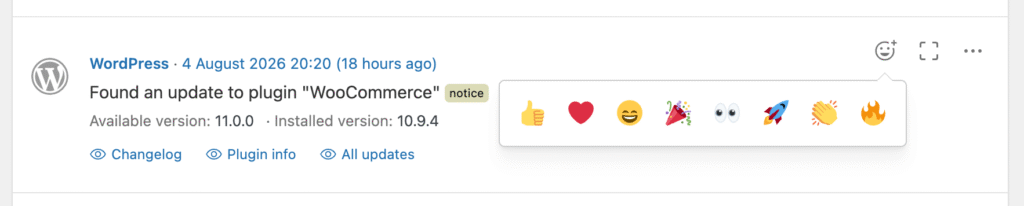
Premium adds more reaction types (❤️ 🎉 🚀 and others) if a single thumbs-up isn’t expressive enough. They are all positive ones. Let’s keep the log-vibe good 🙂
A header status bar that answers “how long is this kept?”
The other graduating feature is the header status bar. It shows the settings that are easy to forget you ever chose: how long history is kept, whether weekly email reports are on, whether alerts are configured, and where logs are being forwarded.
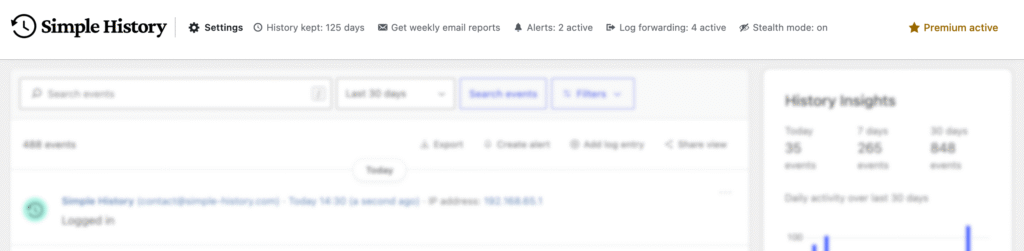
Every item links straight to the setting behind it, so “History kept: 125 days” is one click from the field that changes it.
There’s one addition to the bar that’s easy to overlook but solves a real headache — my personal oh-i-forgot-that-i-had-that-enabled-on-this-site. If you use Stealth mode to hide Simple History from other users, the bar now says “Stealth mode: on”. Stealth mode hides the plugin from everyone not on the allow list — including other administrators — and it’s genuinely hard to remember you turned it on months ago when a colleague asks why they can’t find Simple History anywhere.
Simple History 5.30.0 is out now. Update from Plugins → Updates in wp-admin, or download it from WordPress.org.
Full changelog
Added
- “Plugin info” action link on plugin update-available events, so you can quickly check what an unfamiliar plugin is without leaving the log.
- “Find events from the same IP address” in an event’s actions menu, alongside the existing user and event-type filters.
- Changes to more Simple History settings are now logged: Email Reports, the Experimental features toggle, and add-on license keys (key values are never stored in the log).
- WP-CLI:
--metadata_searchand--ai_onlyoptions onwp simple-history event list, matching the metadata search and AI filter in the GUI. - WP-CLI: AI attribution columns (
ai_agent,ai_detected_via,ai_application) onwp simple-history event list, showing which AI tool made a change and how it was detected. - Header now shows “Stealth mode: on” while stealth mode is hiding Simple History from other users, including other administrators.
Changed
- Reactions graduated from experimental and are now on by default — react to events with a 👍 (disable in Settings → General). Premium adds ❤️ 🎉 🚀 and more reaction types.
- Header status bar graduated from experimental and now shows for all admins — a glance at how long history is kept, whether email reports and alerts are on, and where logs are forwarded, with each one linking straight to its setting.
- Checkbox settings now show as On/Off (instead of 1/0) in the “Modified settings” log details.
- Settings changes are now detected across all save mechanisms (Settings API, direct option updates, and REST) and recorded as a single event.
- Large or structured settings are now logged as “changed” without storing their full value, keeping the log readable.
- Removed an unnecessary database query on every admin page load (a leftover from the one-time history backfill check).
- Developers:
simple_history/user_can_clear_lognow defaults to whether the user can manage settings, instead of always allowing it. The “Clear log” button is unaffected for administrators.
Deprecated
- WP-CLI:
wp simple-history event search— usewp simple-history event list --search=<term>instead. The old command still works (and the bug that made it always return zero results is fixed), but it will be removed in a future version.
Fixed
- WP-CLI:
--fieldsonwp simple-history event listignored column names written with a space after the comma. - PHP 8 fatal error when a setting was changed by a request without a referrer, such as from the REST API or WP-CLI. #649
- Untranslatable strings in the statistics view and the weekly email report. #672
- Invalid date or month filter values now return a clear error (HTTP 400 in the REST API, a friendly message in WP-CLI) instead of a server error.
- RSS feed no longer breaks when its address contains a date filter it can’t read — for example an older feed URL saved in a feed reader. It now returns an empty feed instead of an error.
- Dashboard widget now shows an error message with details when the log can’t be loaded (for example when the REST API is blocked), instead of loading placeholders forever.
- Fatal error on WordPress 6.3 when saving a post that creates a revision.
- Post update events now link to the revision they created. (The link had been missing since the feature was added in 5.16.0!)
- PHP warning when logging a comment whose post has been deleted. Such events now read “a comment to (deleted)” instead of showing an empty title.
- “Filter events: This IP” in the IP address popover did nothing when used from the dashboard widget — it now opens the event log filtered to that address.
- Filtering by IP address now finds events by any address recorded for them, not just the one the web server saw. On sites behind a proxy or load balancer the visitor’s real address is read from a forwarding header, and filtering by it previously returned nothing.
- Experimental — Failed XML-RPC logins no longer create a duplicate “failed application password” entry alongside the regular failed-login entry.
Security
- Looking up a person’s username, email address and roles from the user card now follows WordPress’s own rule and requires permission to list users. Who performed an event is still shown to everyone who can read that event.
- REST API endpoints now require the same permission as opening the history page.
- Detective Mode masks more field names — passwords, tokens, secrets and card numbers — and now also covers nested values, query strings and command line arguments.
- Clearing the log, exporting it and regenerating the RSS feed address now also require permission to manage settings.
- Event text escaping is now consistent across the media, categories, user and comments loggers, and in exported HTML files.
If Simple History is useful to you, a five-star review honestly helps more than you’d think. And if you want more features, there’s Premium.