
Some nice smaller things in this release: Post edits now show what changed in the log. Plus a round of fixes.
See what changed in a post, outside the log too
The log has shown the old and new title and content of a post edit for a long time. The log file however only got “Updated post”, and Copy as JSON got the changes as one block of text. Now both list each change, old → new.
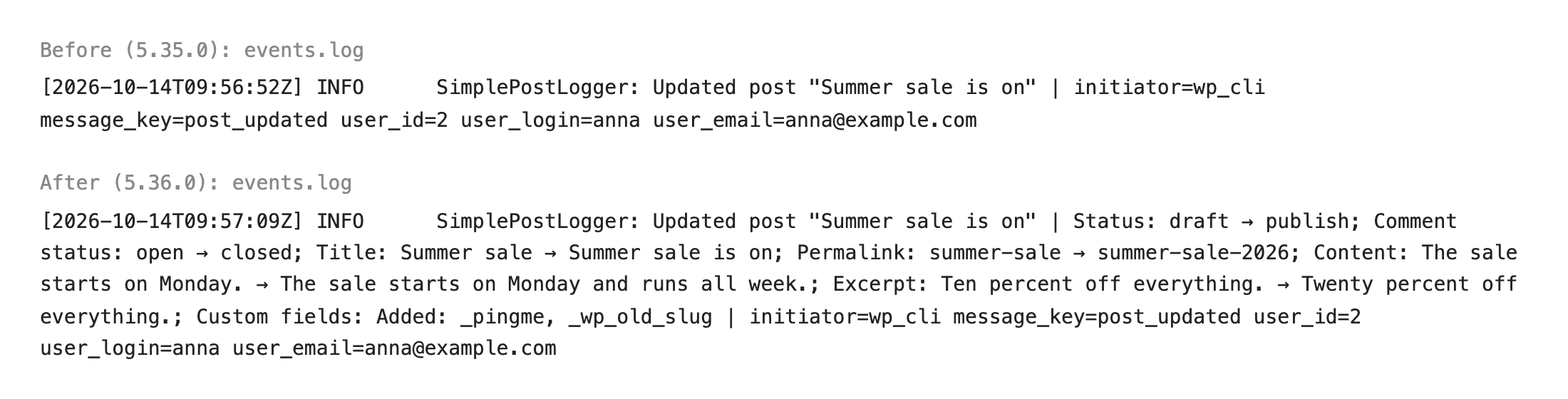
With Premium, alerts and forwarded events show what changed too.
Update from Dashboard → Updates, or download it from WordPress.org. If something looks off, let me know.
Full changelog
Added
- Experimental — A short “Updated to Simple History X.Y.Z” line at the top of the log after an update, with how many new features and fixes it brought and a link to the release post. Premium updates get their own line.
- Experimental — Premium customers see a message on the log page when a subscription payment didn’t go through or the subscription is about to end, and sites with an expired Premium license see what’s new in Premium since their version.
Changed
- Post title, permalink, excerpt and content changes are separate fields with old and new values in the REST API, Copy as JSON and Copy as Markdown. For long posts, only the changed lines of the content are listed.
- Premium and other add-ons check for updates only when WordPress itself checks for updates, so admin pages no longer wait for simple-history.com.
- For developers: the
simple_history/post_logger/label_for_keyfilter also gets the status, publish date, comment status, author and template labels of post changes. Labels are escaped, so return plain text. - For developers: the
simple_history/post_logger/post_updated/diff_table_outputfilter no longer gets the title, permalink, excerpt, content and other changed fields, only the rows that callbacks add.Post_Logger::extra_diff_record()is deprecated and no longer used.
Fixed
- Similar events didn’t load on sites that use SQLite instead of MySQL with version 2.x of the SQLite Database Integration plugin.
- Log files written by Log Forwarding → Local Files now include what changed in each event, like the roles added and removed on a profile edit, not only the event message.
- The one-click weekly email offer and its confirmation now name everyone who will get the email, like the site admin, not only you.
- Page template changes: the first template picked for a page wasn’t logged, block themes showed the template slug instead of its name, and an extra row labelled “page_template_name” showed next to the Template row.
- “Check again” on Dashboard → Updates now checks for new versions of Premium and other add-ons right away, instead of up to an hour later.
Security
- Similar events now follow the same access rules as the log, so editors no longer see events like failed logins there.
- Forwarded IP addresses, usernames and user agents are now capped in length, so a single crafted request can’t fill the log.
- IP addresses in Limit Login Attempts events are now anonymized and hidden from users who can’t view IP addresses.
- Plugin and theme file edits are logged only when WordPress accepts the edit.
- Stealth Mode now also hides events in the REST API and Abilities API, and history links, notices and the command palette, from users outside the allowlist.
- Hardened database queries and output escaping in the plugin stats and the category and settings events.
- Line breaks and control characters in event text are escaped in the log file, so they can’t add fake lines or change what a terminal shows.