
If your team already watches logs somewhere else, WordPress can send its events there too — the same activity log you see in wp-admin, delivered to syslog, Datadog, Splunk, a webhook, a separate database, or a file on disk.
Log forwarding is part of Simple History Premium. It matters most when WordPress is one system among many: an agency running fifty sites, a team with central logging, or anyone who has to answer “who changed this” without logging into WordPress at all.
Where events can go
- Local syslog — write to the server’s own syslog, where whatever already reads it will pick them up
- Remote syslog — send to a syslog server elsewhere, over UDP, TCP or TLS, with token authentication for services like Papertrail and Graylog
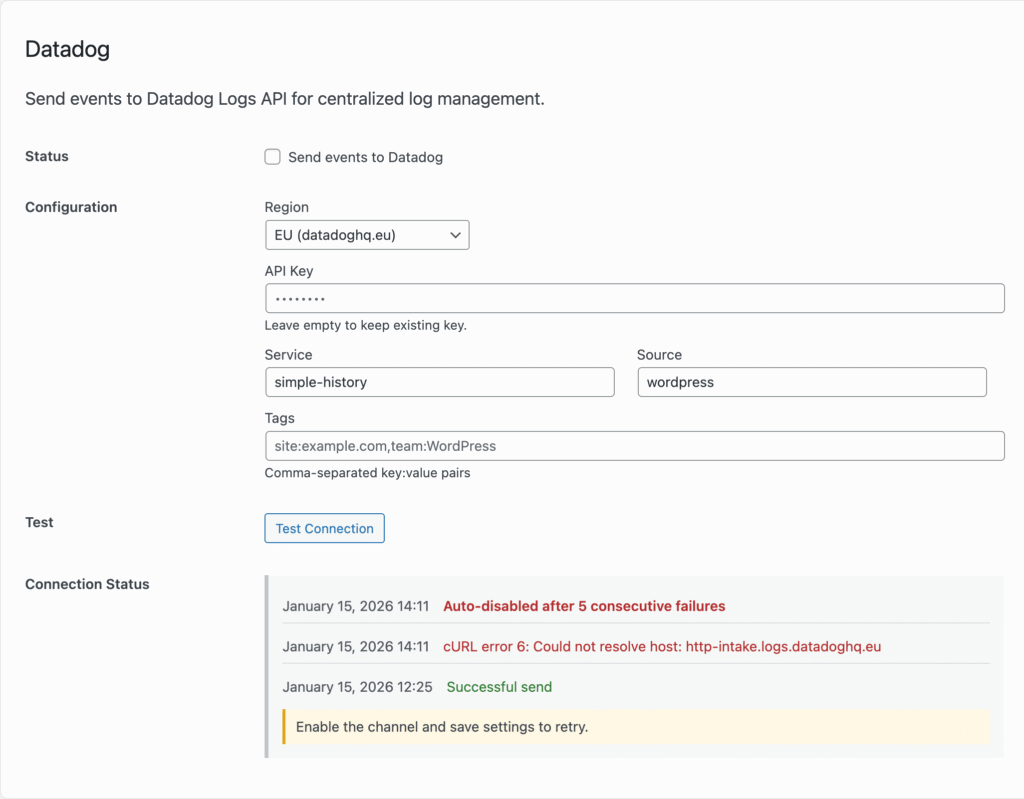
- Datadog — straight to the Datadog Logs API, all regions supported
- Splunk — to the Splunk HTTP Event Collector (setup guide)
- Webhook — any HTTP endpoint, with a JSON payload you can shape yourself. This is the one people point at Zapier, Make, n8n, or a script of their own
- External database — store events in a separate MySQL or MariaDB database, which is how you aggregate many sites into one place or keep history well beyond what the site itself holds
- Log files — written on your own server, in a format a machine can read
Events arrive knowing who did it
A forwarded event carries the person behind it — user ID, login, email and IP address — not just the fact that something happened. That is the difference between an alert you can act on and one you have to go and investigate.
For Datadog specifically, those fields are also mapped onto Datadog’s own reserved attributes, so events populate the built-in user panel and the GeoIP map by themselves instead of landing as generic custom fields you have to build facets for.
If you want to add your own fields to a payload — a post title, a changed setting, whatever context your site cares about — there are filters for that: simple_history/channel/datadog/payload and simple_history/channel/splunk/payload.
File formats a machine can read
The free version writes log files a person can read. Premium adds three machine-readable formats, so whatever is parsing them does not have to guess:
- JSON Lines — one JSON object per line, the format most log tooling expects
- Logfmt — key=value pairs, easy to read in a terminal and easy to parse
- RFC 5424 syslog — the structured syslog standard
For RFC 5424 we registered our own IANA Private Enterprise Number, 64775. That means Simple History’s fields have a proper reserved home inside the message instead of being wedged in wherever they fit — which is what keeps them from colliding with another vendor’s data in a shared collector.
Credentials are stored encrypted
API keys, tokens and passwords for each destination are encrypted before they are stored, rather than sitting in plain text in the options table. HTTP destinations also have an SSL verification toggle, for the case where you are forwarding to something with a self-signed certificate on your own network.
Setting it up
With Premium active, go to Simple History → Settings → Log forwarding, add a channel, and use the test button to confirm events arrive before you rely on it. Channels run independently, so you can send everything to syslog and only security events to Datadog if that suits you better.
Common questions
Can I send WordPress logs to Datadog?
Yes — Simple History Premium forwards directly to the Datadog Logs API, in any Datadog region, with the WordPress user attached to each event so Datadog’s user panel and GeoIP enrichment work without extra configuration.
Can I send WordPress activity to Splunk?
Yes, via the Splunk HTTP Event Collector. You supply the HEC URL and token; events are sent as they happen. The Splunk setup guide walks through turning on HEC, creating a token, and checking that events actually arrive.
Does forwarding replace the log inside WordPress?
No. Events are still written to your WordPress database and still visible in wp-admin. Forwarding is an additional copy, sent to somewhere else.
What happens if the destination is unreachable?
The event is still logged in WordPress, and the channel records the delivery error so you can see that forwarding is failing rather than silently losing data.
Is this useful for compliance?
It can be. Getting events out of WordPress and into a system nobody with WordPress admin access can edit is a reasonable answer to “how do you know the log has not been altered”. See WordPress audit log for the fuller version of that argument.
What does it cost?
Log forwarding is included in Simple History Premium, from $79 a year for a single site, with volume pricing for agencies and a 30-day money-back guarantee.
Start forwarding your WordPress events
$ 79
/year
- Billed annually
- Options available:
- 1 site: $79/year
- 5 sites: $199/year ($39.80 per site)
- 10 sites: $299/year ($29.90 per site)
- 50 sites – $499 ($9.98 per site)
- 500 sites – $1199 ($2.40 per site)
| Version: | 1.16.0 |
| Last update: | September 2026 |
What’s included
- Premium Plugin
- 1-year of plugin updates (includes new features & security updates)
Version history
- See releases archive
Requirements
- WordPress 6.3 or higher
- Simple History 5.34.0 or higher
- PHP 7.4 or higher