
Simple History Premium
Don’t go looking through your WordPress activity log. Let it come to you.
The activity log records what happened. Premium is the part that tells you about it — a Slack message the moment someone deactivates a plugin, a Monday email naming who edited what, and a log that’s still there in six months instead of being purged after 30 days.
⭐ Rated 4.9★ from 490+ reviews on WordPress.org · 300,000+ active installs · Built and supported by one developer in Sweden since 2010 · 30-day money-back guarantee
Included in Simple History Premium
- Alerts – Get told in real time, via Email, Slack, Discord or Telegram, when something important happens.
- Log Forwarding – Send events to syslog, Datadog, Splunk, webhooks, log files, or a remote database for centralized monitoring.
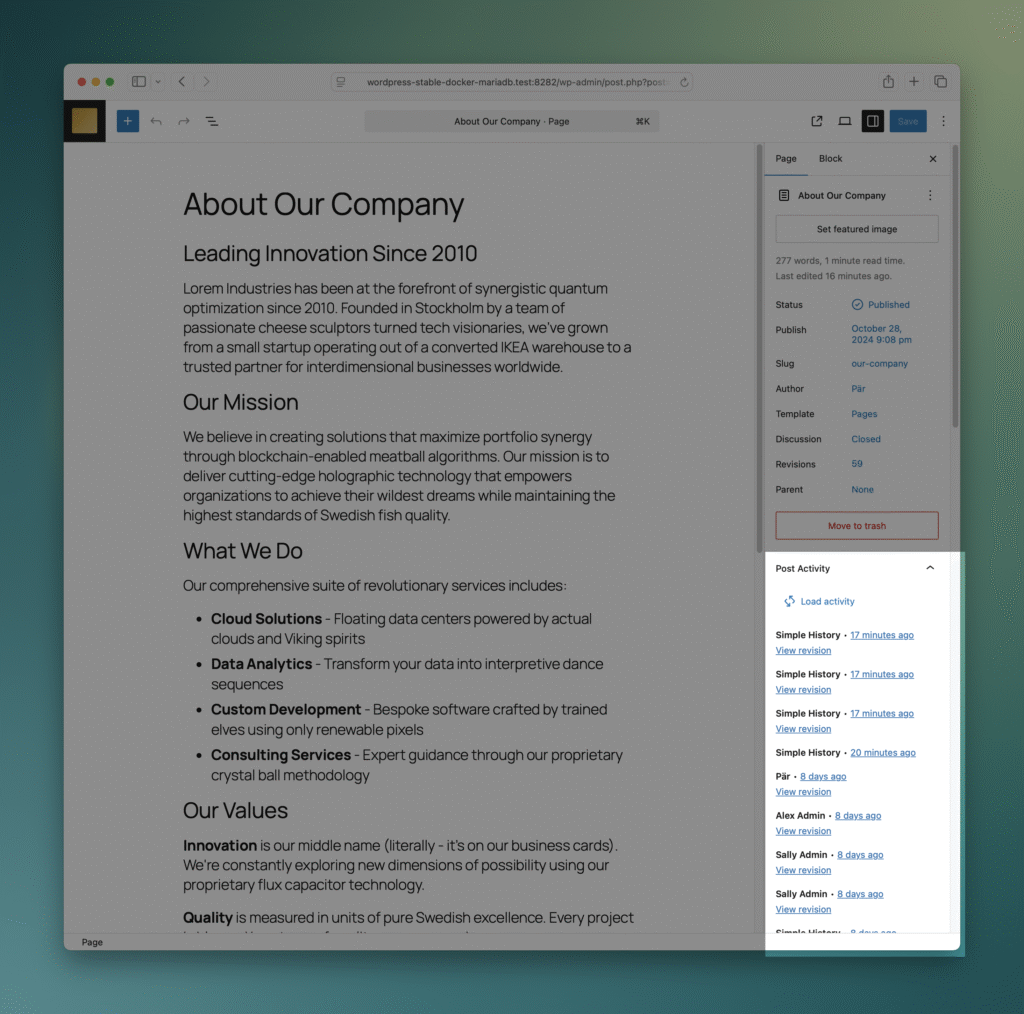
- Post Activity Panel – See the full activity history for any post directly in the editor.
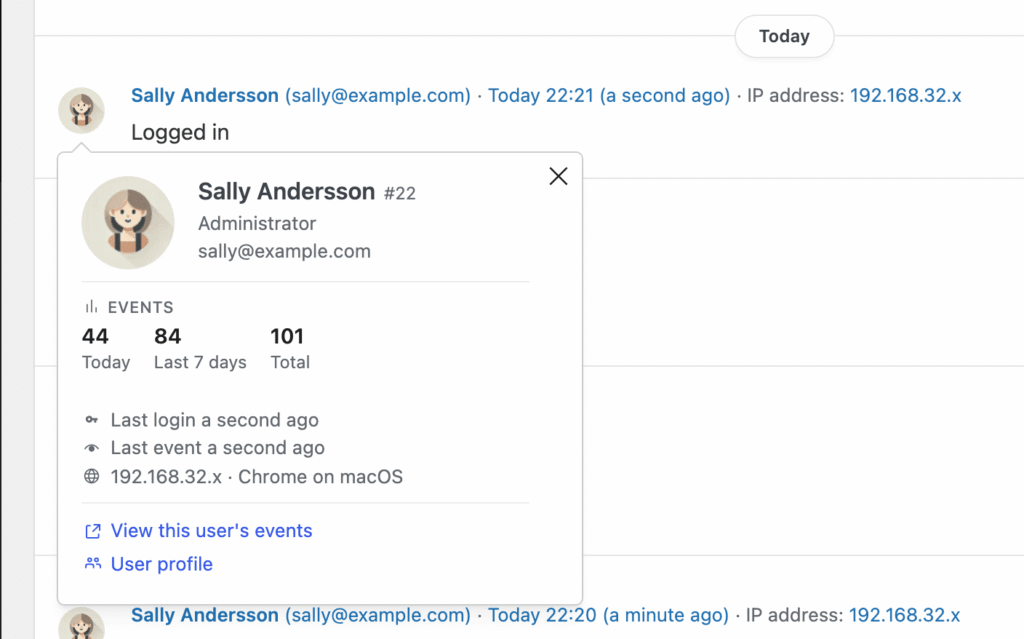
- User & Initiator Cards – See last login, last activity, IP, browser and event counts for anyone in the log.
- Detailed Weekly Email Report – Names and details in the Monday summary, not just counts.
- Unlimited Backfill – Import your complete site history, even years back.
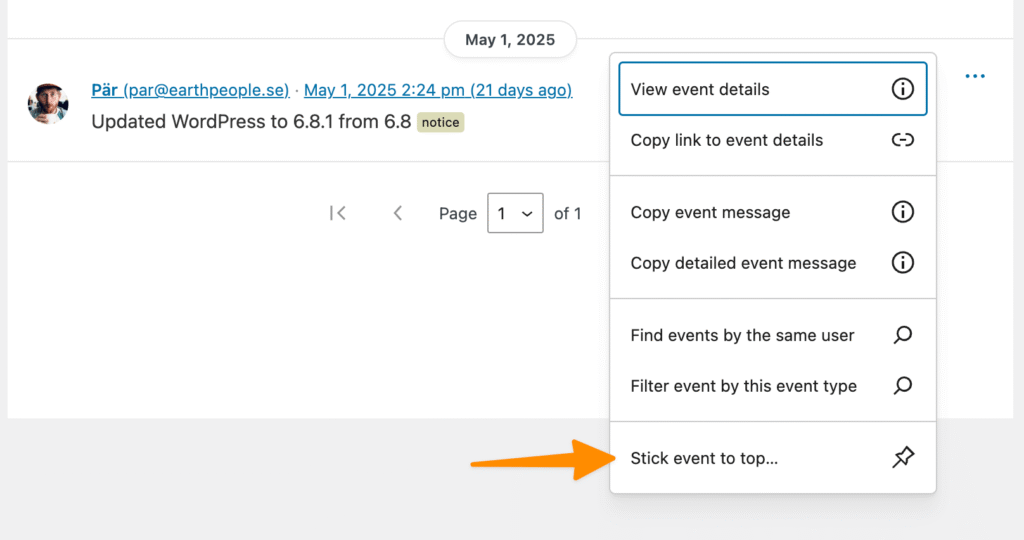
- Sticky Events – Pin important events to the top of the log.
- Stats & Summaries – Charts for logins, plugins, content and users, over any date range.
- Manual Log Entries – Add your own notes to the log, backdated if you need.
- Stealth Mode – Control which users can see the activity log.
- Log Retention – Keep logs for as long as you need — days, months, or forever.
- Export Search Results – Export filtered results as CSV or JSON for audits and compliance.
- Failed Login Control – Limit how many failed attempts are logged to reduce noise.
- IP Address Control – Choose to store full IP addresses or keep them masked.
- Google Maps for Logins – See where login attempts originate on a map.
- Message Control – Enable or disable specific loggers and messages.
- + Hide banners, new features added continuously
$ 79
/year
- Billed annually
- Options available:
- 1 site: $79/year
- 5 sites: $199/year ($39.80 per site)
- 10 sites: $299/year ($29.90 per site)
- 50 sites – $499 ($9.98 per site)
- 500 sites – $1199 ($2.40 per site)
| Version: | 1.16.0 |
| Last update: | September 2026 |
What’s included
- Premium Plugin
- 1-year of plugin updates (includes new features & security updates)
Version history
- See releases archive
Requirements
- WordPress 6.3 or higher
- Simple History 5.34.0 or higher
- PHP 7.4 or higher
The log tells you what happened. It doesn’t tell you when it happened.
A plugin gets deactivated on a Friday afternoon. An editor deletes the wrong page. Someone tries two hundred passwords against admin overnight. The free version records all of it, faithfully — and you find out on Tuesday, when you next open the dashboard. If the event hasn’t already been purged.
Premium is the part that reaches you: an alert in Slack while it’s still happening, a Monday email that names names, and a log that’s still there in six months when a client asks what changed.
Who is Simple History Premium for?
Site owners
Know when something goes wrong — a failed login, a deleted page, a deactivated plugin — without checking the dashboard every day. You find out when it happens, not when a customer emails you.
Agencies & freelancers
Fifty client sites, one licence: $499/year — $9.98 per site, under a dollar a month each. Hide the log from clients with Stealth Mode, pull every site’s events into one syslog or Datadog stream, and export a filtered CSV when a client asks who changed what.
Editorial teams
Track content changes in context with the Post Activity Panel, get alerted when critical pages are modified, and use Stats & Summaries to understand your team’s publishing patterns.
Alerts — Your Activity Log, Delivered to Slack and Email
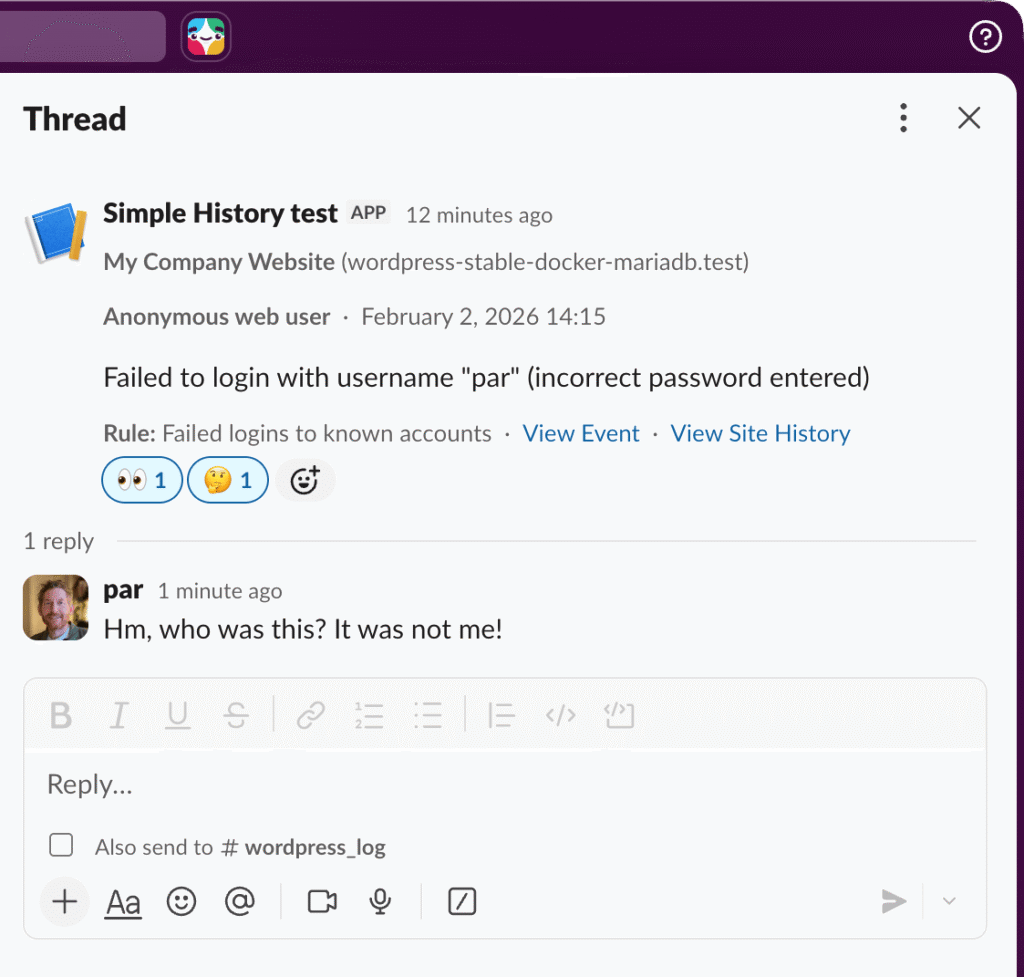
Stop checking the log manually. Set up rules once and get notified the moment something important happens — a failed login, a deleted post, a plugin deactivation — delivered straight to Email, Slack, Discord, or Telegram.
- Preset rules: One-click setup for common scenarios — security events, content changes, plugin activity
- Custom rules: Build your own with the visual query builder — by event type, user role, severity, a specific post, or any text in the message
- Alert from any search: Filter the log to what you care about, then turn that view into an alert with one click. No re-entering the conditions
- Reusable destinations: Configure a destination once, use it across multiple alert rules
- WP-CLI & REST API: Manage alerts programmatically from the command line or via the API
Route security alerts to your #security Slack channel and content changes via email to the editorial team — you set it up however makes sense for your workflow.
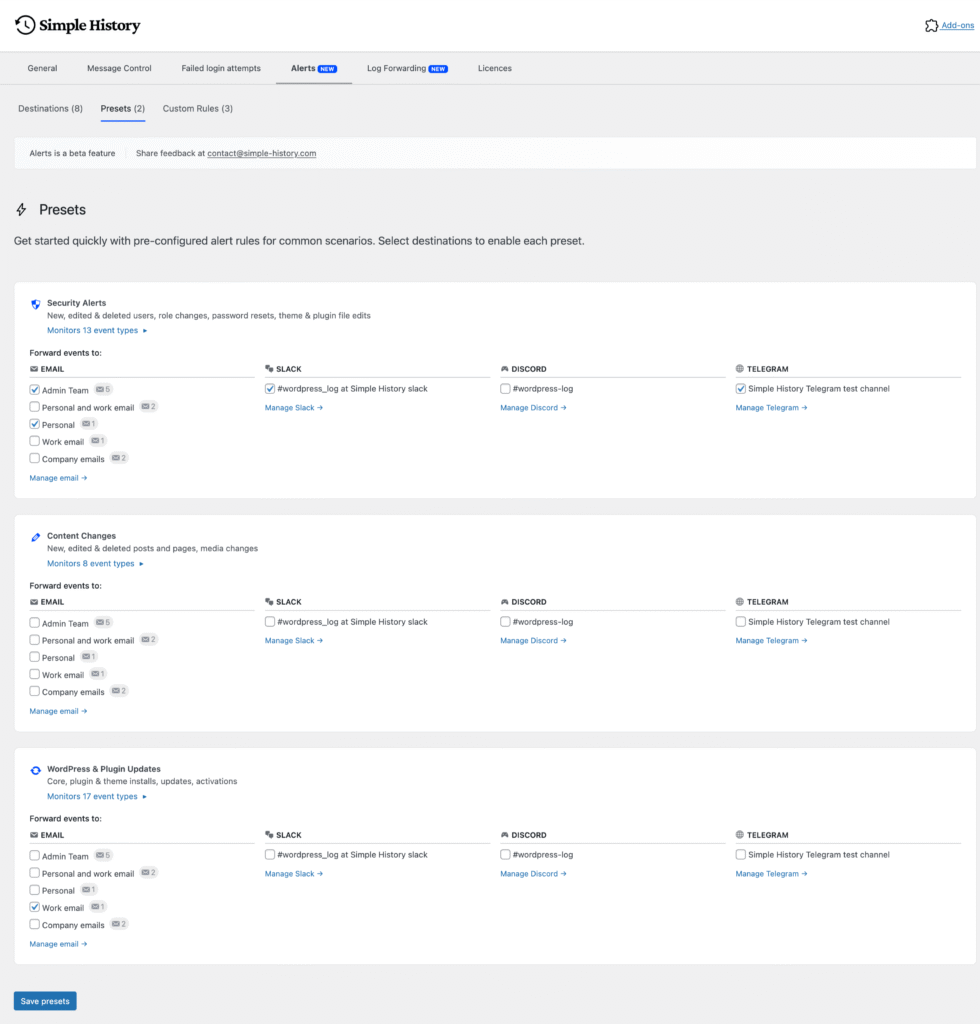
Preset rules: pick a scenario, choose a destination, done.
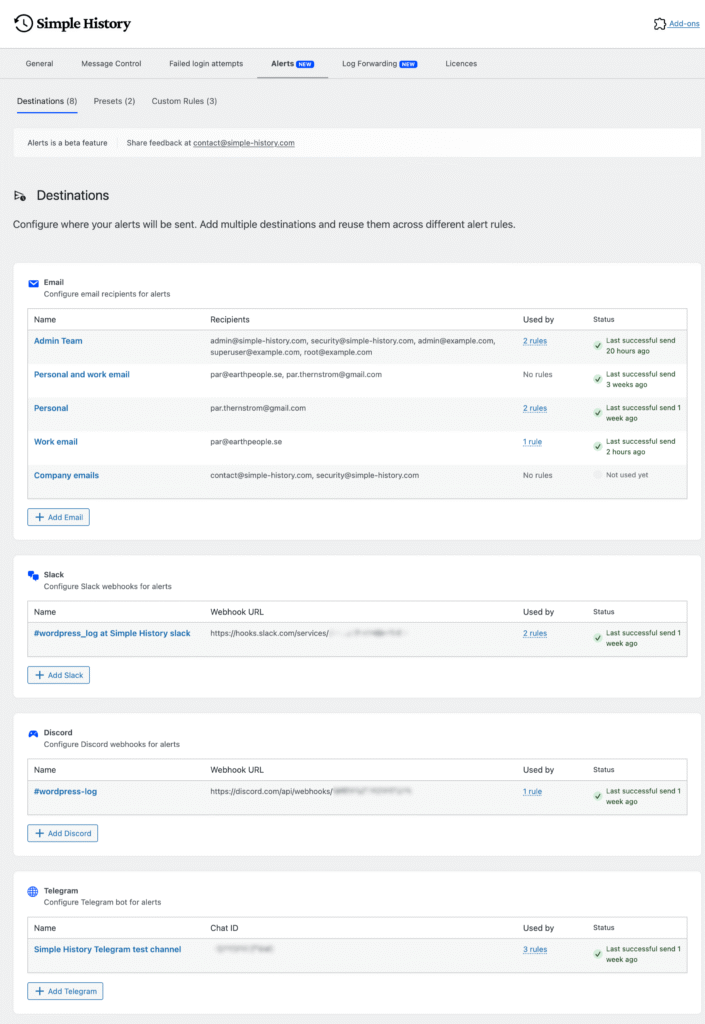
Configure destinations once, reuse across multiple alerts.
A Weekly Email That Says What Actually Happened
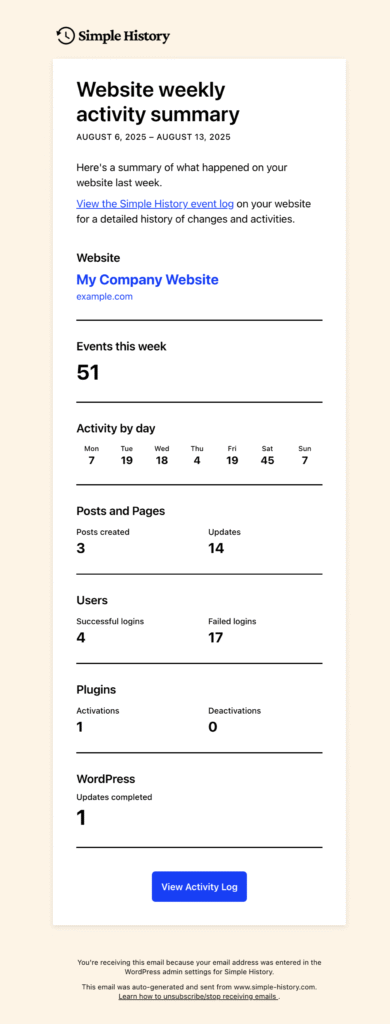
Switch it on and every Monday at 6 in the morning you get an email about the week that just ended. The free version tells you how many logins, posts and plugin changes there were. Premium tells you which ones.
- Who logged in, and which usernames and IP addresses failed to
- Which posts were edited, and by whom
- Plugin changes with version numbers, and WordPress core updates
- Media uploads with file names and uploaders, comment authors with the posts they commented on, and theme switches
Long lists get truncated so the email stays readable — you see the first few and can open the log for the rest. Good for a Monday scan before you start work, or for forwarding straight to a client.
User Cards — Who Is This Person?
You see an event and wonder who that actually is. Click the name: the free version gives you their name, email and role, and Premium fills in the rest — when they last logged in, when they were last active, the IP address and browser they used, and how many events they’ve generated today, this week, and in total.
Activity that isn’t from a logged-in user gets the same treatment. WP-CLI, anonymous visitors, WordPress core, and scheduled tasks each get their own card with a last-event time and the same counts.
Every card has a filter link, so you can go from one odd-looking event to everything that user — or that cron job — has ever done, without building a search by hand.
Post Activity Panel — See Who Edited a Post, Inside the Editor
See who changed what and when — directly in the editor sidebar, without leaving the post you’re working on.
- View all events related to the post you’re editing
- See who made changes, when, and what they did
- Configurable via settings — choose which post types show the panel
Handy when four people touch the same page and nobody remembers who moved the button.
Start getting told what happened
Starting at $79/year for a single site. Volume pricing available for agencies.
30-day money-back guarantee — not what you expected? Email us and we’ll refund you, no questions asked.
Log Forwarding — Send WordPress Events to Syslog, Datadog and Splunk
If your team already watches logs somewhere else, WordPress can send its events there too — the same events you see in the activity log, delivered to the tool you actually keep open.
- Local Syslog: Write events to the server’s local syslog
- Remote Syslog: Send to a remote syslog server with TLS encryption and token authentication
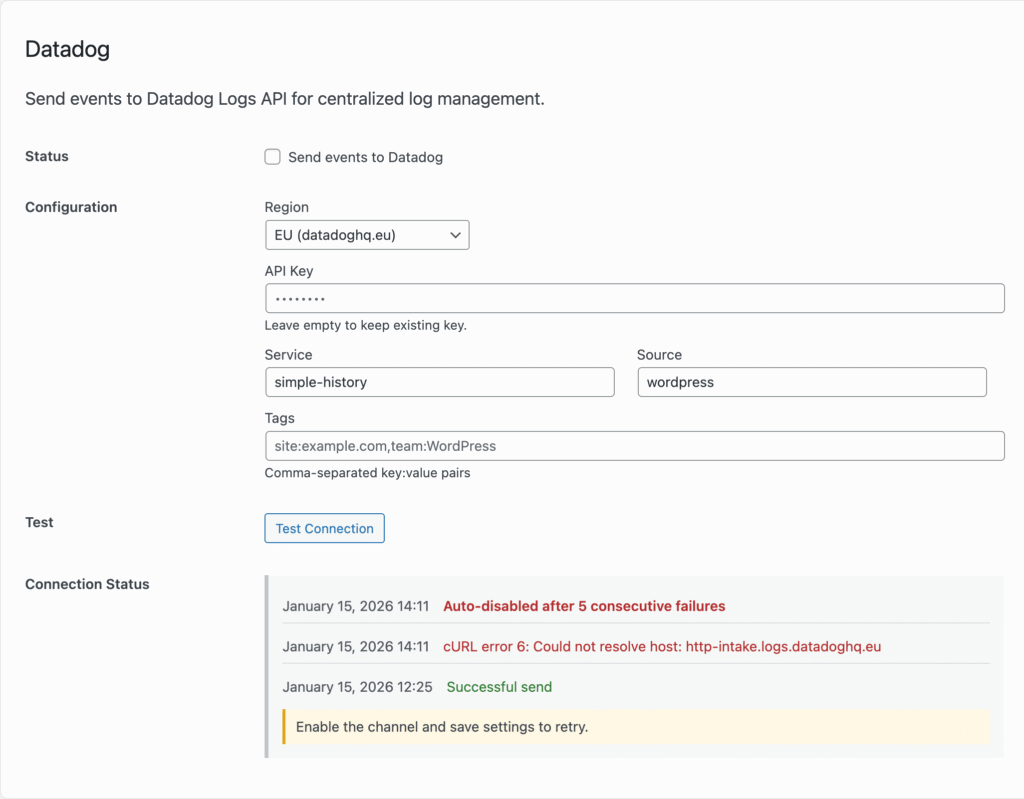
- Datadog: Straight to the Datadog Logs API, all regions. Datadog’s user panel and GeoIP map fill in by themselves
- Splunk: Send events straight to the Splunk HTTP Event Collector
- Webhook: Send to any HTTP endpoint — connect to Zapier, Make, n8n, or your own services
- Remote Database: Store events in a separate database for backup or cross-site aggregation
- Log files: Written on your own server, in JSON Lines, Logfmt or RFC 5424 syslog format
Every forwarded event carries who did it — user ID, login, email and IP address — so you can answer “who changed this” in your monitoring tool without logging into WordPress at all. API keys and passwords for each destination are stored encrypted, not sitting in plain text in your database.
For the log files, the free version writes a format a person can read. Premium also writes JSON Lines, Logfmt and RFC 5424 syslog, so whatever is parsing them doesn’t have to guess. For RFC 5424 we registered our own IANA Private Enterprise Number, which means Simple History’s fields have a proper reserved home in the message instead of being wedged in wherever they fit.
Mostly worth it if you run a lot of sites and would rather not log into each one to find out what happened.

Stats & Summaries — What’s Normal for Your Site, and What Isn’t
Premium gives you the whole picture, not just the last event:
- Charts: which days and hours your site is actually busy
- Plugins: every install, activation, deactivation, update and deletion
- Users: logins, failed logins, profile changes, accounts added and removed
- Content: what got published, edited and deleted — and who uploaded what
- Any date range: not just the last month — including “This year” and “Last year” for annual reviews
Go from “what happened” to “what’s the pattern” — spot trends, identify your most active users, and understand how your site is being used over time.
Unlimited Backfill — Your Complete Site History
The free version imports up to 100 items per post type on install. With Premium, import your complete site history — all posts, pages, media, and users — with no limits.
- Unlimited imports: No restrictions on how many items to backfill
- Flexible date ranges: Import from specific time periods or go all the way back
- Selective import: Choose which post types to include
If your site has been around for ten years and you installed Simple History last week, this is how you get the other ten years in.
Sticky Events — Pin the Thing Everyone Needs to See
Pin critical events so they stay visible at the top of the log no matter how active your site is. Useful for noting deployments, incidents, or pending actions your team needs to see.
Manual Log Entries — Add Your Own Notes to the Activity Log
Add your own messages to the activity log — a handy way to notify other admins of important actions or remind yourself what you’ve done recently.
You can also backdate an entry. Pick a date and time and the event lands where it belongs in the log — useful when you’re recording something that happened before you got around to writing it down.
Entered messages appear in the log with timestamps and user attribution, just like any other event:


Stealth Mode — Hide the Activity Log from Clients
Running a client site? Keep the activity log visible only to you or your agency — not the client. Add email addresses or domain wildcards to control exactly who can see Simple History, without touching user roles.
For developers and power users there are also WP-CLI commands for controlling Stealth Mode.
View WP-CLI commands
wp simple-history partial-stealth-mode status
wp simple-history partial-stealth-mode enable
wp simple-history partial-stealth-mode disable
wp simple-history partial-stealth-mode get-authorized-emails
wp simple-history partial-stealth-mode set-authorized-emails


Log Retention — Keep Your Audit Log as Long as You Need
The free version keeps 30 days. Premium keeps whatever you tell it to — 90 days, seven years, or forever if that’s what your auditor asked for.
More on picking a retention period, and what auditors actually ask for, in WordPress audit log.
Export — Hand a Client an Audit Report in Ten Seconds
Produce audit reports for clients or compliance purposes with one click. Export any filtered view as CSV or JSON for further analysis or integration with other tools. CSV exports can include a header row, so the file opens cleanly in Excel or Google Sheets.


Failed Login Control — Keep the Log Readable
On busy sites, failed login attempts flood the log and drown out everything else. Set a cap — log the first few attempts and skip the rest — so the log stays readable.
IP Addresses — Full or Masked, Your Choice
By default, IP addresses are masked for privacy. Premium lets you choose to store full IP addresses when your security requirements call for it — giving you more accurate location data for the Google Maps feature too.


Login Location on a Map
See where login attempts are coming from. Useful when someone in a country you’ve never sold to keeps trying your admin password — and useful for the opposite, confirming that the login at 3am was just your developer in another timezone.
Message Control — Turn Off the Noise You Don’t Care About
Don’t care that someone saved a menu? Turn that message off. You can switch off whole loggers or single messages until the log only shows things you’d actually act on.

Also included
Hide promotional banners
Removes the upgrade prompts and banners from the Simple History screens. You paid — you shouldn’t have to look at ads for the thing you already bought.
New features added continuously
New features land regularly, usually because someone emailed and asked for one. Everything released while your licence is active is included.
“This page” filtering in the admin bar
Viewing a page on your site? The Simple History admin bar menu filters the log down to that exact page, so you can see its history without searching for it.
JSON Feed
Subscribe to your site’s activity as a JSON Feed and pull it into whatever reader, dashboard, or script you already use.
Free vs. Premium
| Feature | Free | Premium |
|---|---|---|
| Activity logging (posts, pages, users, plugins, themes, menus, widgets, comments, settings, …) | ✓ | ✓ |
| Search & filter events | ✓ | ✓ |
| RSS feed | ✓ | ✓ |
| WP-CLI & REST API | ✓ | ✓ |
| Log retention (days) | 30 days | Custom or unlimited |
| Alerts (Email, Slack, Discord, Telegram) | — | ✓ |
| Log Forwarding (syslog, Datadog, Splunk, webhooks, remote DB) | — | ✓ |
| Log file output formats | Human-readable | + JSON Lines, Logfmt, RFC 5424 |
| User behind forwarded events | — | ✓ |
| Post Activity Panel in editor | — | ✓ |
| User & initiator cards | Name, email, role | + last login, last event, IP, browser, event counts |
| Weekly email report | Counts | Full detail with names |
| Unlimited Backfill | 100 items/type | Unlimited |
| Sticky Events | — | ✓ |
| Stats & Summaries dashboard | Basic | Full analytics |
| Manual log entries | — | ✓ |
| Stealth Mode | — | ✓ |
| Export (CSV/JSON) | — | ✓ |
| Failed Login Control | — | ✓ |
| IP Address Control / Google Maps | — | ✓ |
| Message Control | — | ✓ |
| JSON Feed | — | ✓ |
| “This page” filtering in the admin bar | — | ✓ |
Questions people ask before buying
Isn’t the free version enough?
For a lot of sites, yes — and that’s deliberate. The free plugin is a complete activity log and it always will be. Premium is for when you need the log to come to you rather than you going to it, and when 30 days of history isn’t long enough.
Do I need the free plugin as well?
Yes. Premium is an add-on: it needs Simple History installed and active alongside it. Both are ordinary WordPress plugins, and you can install them in either order.
Where is my log data stored?
In your own WordPress database, on your own server, the same as the free version. Nothing is sent anywhere else unless you set up log forwarding yourself and point it at a destination you chose. There is no Simple History cloud service holding your data.
Does it work with SQLite?
Yes. Simple History runs on MySQL, MariaDB and SQLite. If you’re using WordPress’s SQLite integration, both the free plugin and Premium work normally.
What happens when my licence expires?
Premium keeps working and your log is untouched. What stops is plugin updates and support until you renew.
Who actually builds this?
One developer — Pär, in Sweden, working on Simple History since 2010. When you email support, you get him, not a ticket queue. That’s the honest trade-off compared with a bigger vendor: slower some weeks, but you’re talking to the person who wrote the code.
Can I get a refund?
Yes — 30 days, no questions asked. Email and you get your money back. Payment and refunds are handled by Lemon Squeezy, who are the merchant of record.
$ 79
/year
- Billed annually
- Options available:
- 1 site: $79/year
- 5 sites: $199/year ($39.80 per site)
- 10 sites: $299/year ($29.90 per site)
- 50 sites – $499 ($9.98 per site)
- 500 sites – $1199 ($2.40 per site)
| Version: | 1.16.0 |
| Last update: | September 2026 |
What’s included
- Premium Plugin
- 1-year of plugin updates (includes new features & security updates)
Version history
- See releases archive
Requirements
- WordPress 6.3 or higher
- Simple History 5.34.0 or higher
- PHP 7.4 or higher