
If you use a block theme, the Site Editor has been a blind spot in your activity log. Not anymore. This release also adds support for the official WordPress AI plugin, so you can see which plugins and themes have been granted access to which AI providers. Plus a round of security hardening and the usual pile of fixes.
Site Editor changes are logged now
This one has bothered me for a while. If your site runs a block theme, a lot of the actual work happens in the Site Editor. None of it was showing up in the log. Someone rewrites a template, swaps the site-wide typography, renames a navigation menu, and the log had nothing to say about it.
Simple History now logs changes to templates, template parts, site-wide styles, patterns, navigation menus and fonts. That includes changes made outside the editor, through WP-CLI or the REST API.
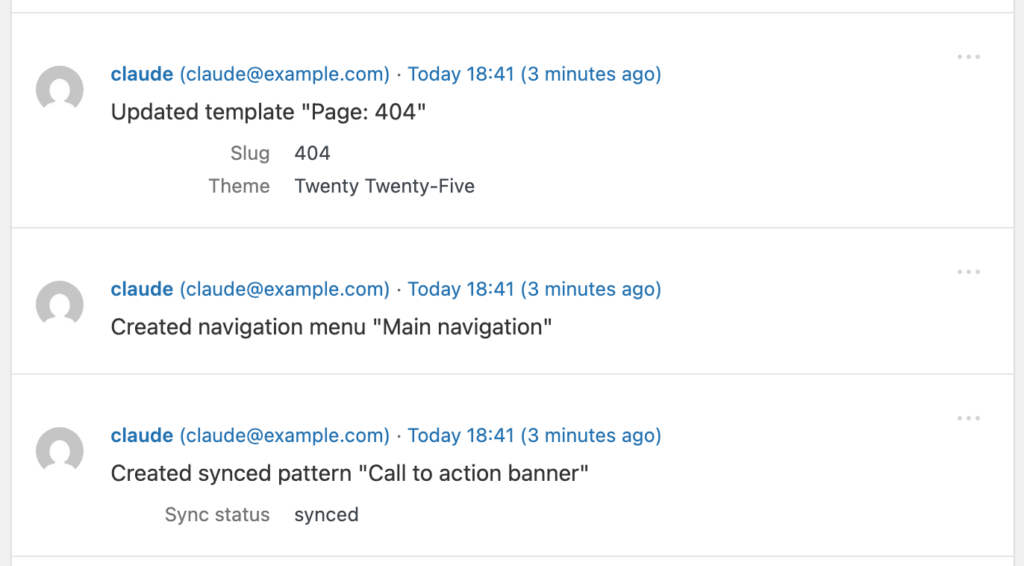
One small thing: when you reset a template back to the theme default, that’s logged as a reset. Under the hood WordPress deletes your customized version, so the easy thing to log would be “deleted template”. But you didn’t delete a template. You put it back. The log says so.
The official WordPress AI plugin
WordPress has an official AI plugin now. Plugins and themes can ask it for access to AI providers, and you approve or deny each request on the Connector Approvals screen.
Those are permissions, and permissions belong in the activity log. So Simple History records when AI features are turned on or off, when a feature’s provider or model changes, and when a plugin or theme asks for access, gets it, or loses it.
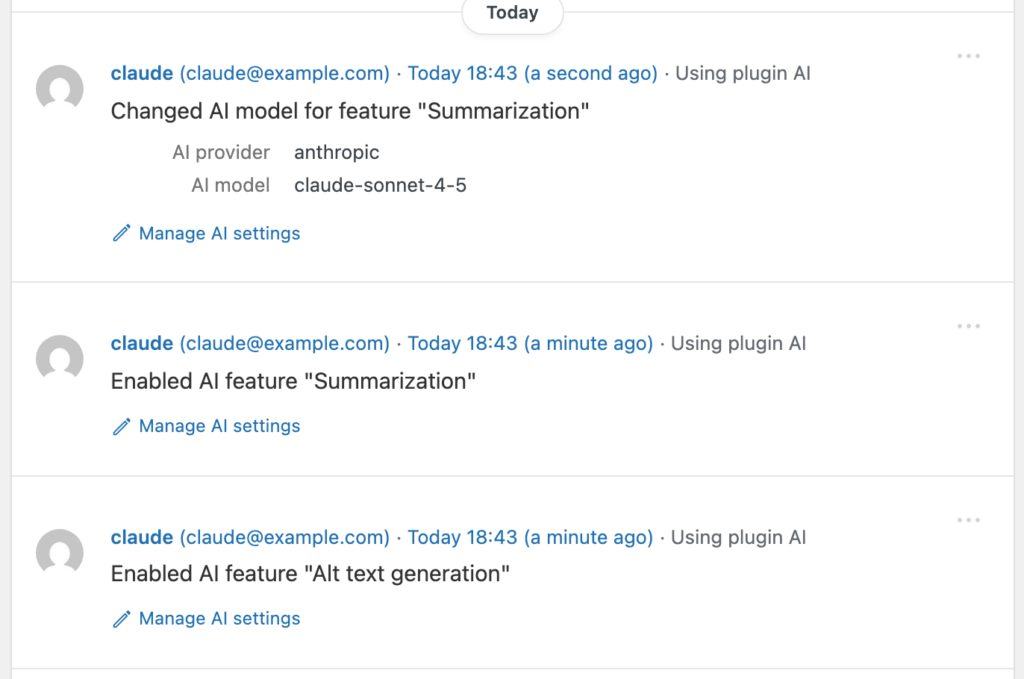
What is not logged: API keys and the content of AI prompts are never stored. You get the who, the what and the when. Nothing from inside the prompt itself.
Security fixes
The one I’d point at first is comment escaping. Comment content is escaped before it reaches the event details panel now. Previously anyone who could leave a comment could put markup into your log.
The RSS feed no longer breaks when logged content contains the ]]> character sequence, which is another one a commenter could trigger. And the referring URL stored with every event now gets secret-looking query string values masked, the way Detective Mode already did. The rest are smaller, and they’re all in the changelog below.
None of these needed anything exotic to exploit. That’s exactly why they were worth fixing.
Simple History 5.31.0 is out now. Update from Plugins → Updates in wp-admin, or download it from WordPress.org. If something looks off, let me know on the support page.
Full changelog
Added
- Site Editor changes are now logged: templates, template parts, site-wide styles, patterns, navigation menus and fonts, including changes made outside the block editor. Resetting a template to the theme default is logged as a reset, not a deletion.
- Support for the official WordPress AI plugin: Simple History now logs when AI features are enabled or disabled, when a feature’s AI provider or model is changed, and when plugins or themes request, are granted, or lose access to AI providers on the Connector Approvals screen. API keys and AI prompt content are never stored in the log.
--format=jsonand--format=yamlonwp simple-history info, so a deploy or CI script can check that Premium is active and licensed.- Experimental — Activity log is now available to AI tools and automation through the WordPress Abilities API (WordPress 6.9+). Read-only — nothing exposed can change or delete log entries.
Changed
- Tested on WordPress 7.1.
- Theme update events now name the version the theme went from and to, the way plugin update events already did.
- Experimental — Role events no longer list every capability in the details panel when there are more than 10; the count stays in the event message and the full list in the event context.
Fixed
- “Deleted user” events showed a blank id, email and login instead of the details of the removed user.
- Personal data export requests were logged whatever their status, not only when newly requested.
wp simple-history infonever showed the license line on sites with Premium active.- Event counts are now grouped for your locale — “187 304 events” rather than “187304 events” — in the log header, the stats bar, pagination and grouped-event counts.
- Backfill notice showed a stray
in its item counts on locales that separate thousands with a space. - “Today” and “Yesterday” date dividers, and the “Today” label on each event, switched over at UTC midnight instead of your own midnight, so recent events could show the wrong day.
- Welcome notice shown after install no longer appears on the history page it links to, so its “Take a look” link always goes somewhere.
- Log now shows the real reason it failed to load instead of “Unknown error” — on most sites every error detail was being discarded before it reached the screen.
- Database errors while loading the log now name the problem, so you can act on it or pass it to your host.
Security
- Comment content is escaped before it reaches the event details panel, so a comment can no longer put markup into the log.
- RSS feed no longer breaks when logged content contains the
]]>character sequence, which anyone able to leave a comment could trigger. - Colour values from the theme customizer are validated before being drawn as a swatch, so a theme with a permissive colour setting cannot inject CSS into the log.
- CSV exports treat tab and carriage return as formula triggers, alongside the
=,+,-and@already covered. - Additional escaping and input validation across the options, theme and media loggers.
- Referring URL stored with every event now has secret-looking query string values masked, the way Detective Mode already masked the URLs it stores.
- Masking now also covers session, bearer, credentials and private key field names.
If Simple History is useful to you, a five-star review honestly helps more than you’d think. And if you want more features, there’s Premium.